Send support the HAR file. Keep your tokens.
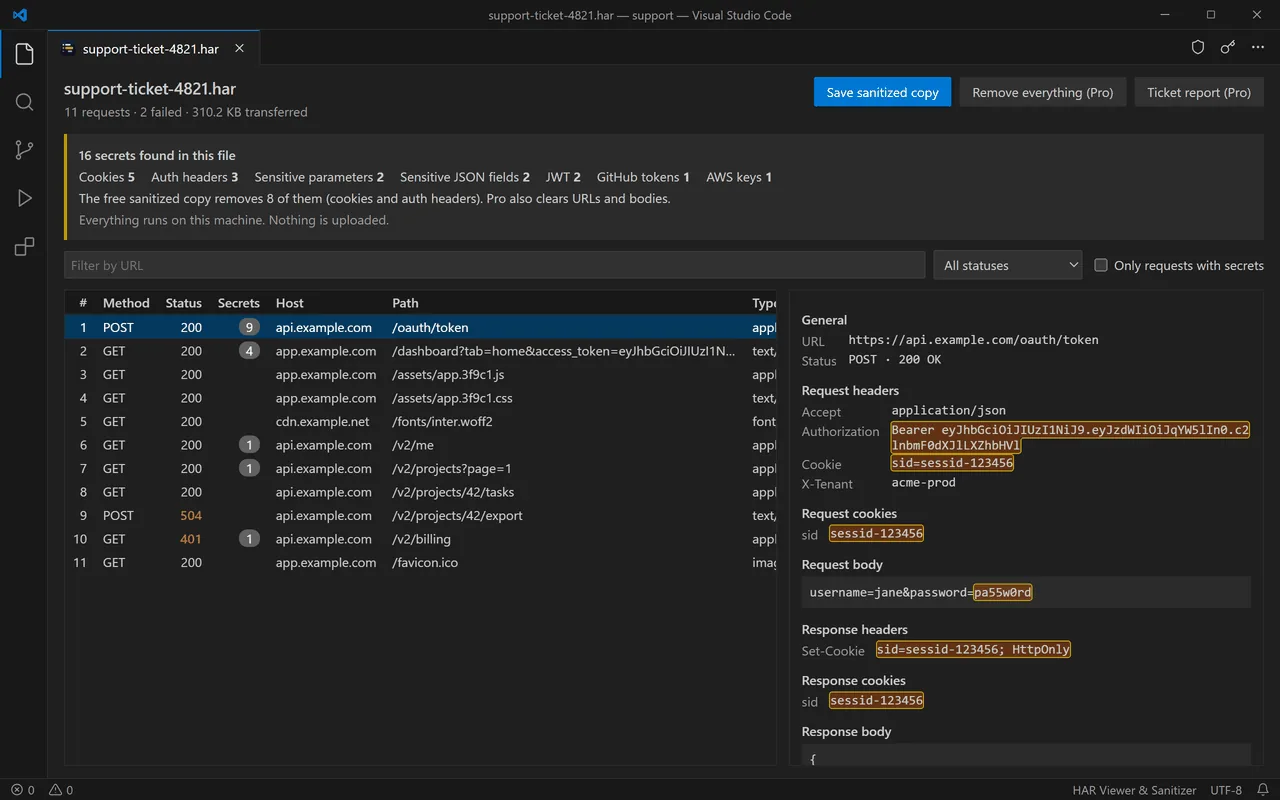
HAR Viewer opens the capture inside VS Code, shows every request, flags the cookies, Authorization headers and API keys it holds, and writes a clean copy in one click. The file never leaves your machine: no upload, no online sanitizer.
- Nothing uploaded
- No account
- 11 secret types detected
How it works
Three steps, no account, nothing uploaded.
- Open the .har fileExport the capture from Chrome, Edge, Firefox or Safari DevTools and open it in VS Code. Every request lands in a table you can filter by URL, by status, or to show only the requests that carry secrets.
- See what it gives awaySession cookies, Authorization and API key headers, JWT, Bearer tokens, AWS, GitHub, Slack, Stripe and Google keys are counted and highlighted, request by request, before anyone else sees them.
- Send a clean copyOne click writes capture.sanitized.har with cookies and auth headers replaced by [REDACTED]. Pro also clears URLs, bodies and e-mail addresses, and drafts the ticket report. Your original file is never modified.
What the extension does
A viewer and a sanitizer for the file support keeps asking for. It does not capture traffic and does not replace DevTools: it makes the HAR safe to share and quick to read.
Every request, readable
Method, status, host, path, type, size and time in one table. Headers, cookies, query parameters and bodies in the detail panel, JSON pretty-printed.
Secrets found before they leak
11 kinds detected: session cookies, Authorization and API key headers, sensitive parameters and JSON fields, JWT, Bearer, AWS, GitHub, Slack, Stripe and Google keys.
Full sanitizing (Pro)
Tokens in URLs, query strings, form fields, request and response bodies, and e-mail addresses replaced too. Add your own rules: header names, parameters, JSON keys or regular expressions.
100% local
The file is read and written on your machine. No telemetry, no upload. The only network call is the licence check with Gumroad when you enter a Pro key, and it carries the key, never your file.
Folders and comparisons (Pro)
Sanitize every HAR of a folder in one command, or compare two captures: requests added, removed, with a different status or slower than before.
A ticket report ready to paste (Pro)
Failed and slow requests summarised in Markdown, or every request as CSV, with secrets already removed. Paste it into the ticket and skip the back-and-forth.
Free, and Pro when you need it
The free version makes the file safe for the common case, cookies and auth headers, with no limit and no expiry. Pro is for the day the token sits in a URL or a response body, or you send HAR files every week: one leaked session costs more than a licence you pay once.
Free
On the VS Code Marketplace and Open VSX, with no time limit.
- Open any .har file in a filterable table
- Headers, cookies and bodies in detail
- 11 kinds of secrets detected and highlighted
- Sanitized copy: cookies and auth headers
- Tokens in URLs and bodies, e-mails
- Folders, comparison, ticket report
Pro
One licence key, no expiry, up to 5 machines.
- Everything in the free version
- Tokens removed from URLs, parameters and bodies
- E-mail addresses masked
- Your own rules: headers, JSON keys, regex
- Whole folders sanitized in one command
- Compare two captures
- Ticket report in Markdown or CSV
Refunded within 14 days, no conditions and no questions asked. Payment, invoice and VAT handled by Gumroad, merchant of record.
Frequently asked questions
Is my HAR file sent anywhere?
No. The extension reads the file you open and writes the copy you ask for, on your machine. The only network call it ever makes is checking your licence key with Gumroad when you activate Pro, and that call carries the key only.
Chrome already has a sanitized export. Why this?
Chrome's sanitized export leaves out cookies and authorization headers. Tokens in URLs, API keys in custom headers and secrets inside request or response bodies stay in the file. HAR Viewer shows you what is left, and Pro removes it.
Why not an online HAR sanitizer?
To clean the file, an online tool has to receive it first, secrets included. Here the file never leaves VS Code.
Can it guarantee that no secret is left?
No tool can promise that for every in-house format. Detection covers the formats listed above. Always look at the copy before sharing it, and add a custom rule for your own token names.
How does the licence key work?
Gumroad emails you a key right after payment. In VS Code, run “HAR: Enter a Pro licence key” and paste it: it is checked once online, then stored locally, and the extension keeps working offline. Up to 5 machines, no expiry, no subscription.
Does it work in Cursor, VSCodium or Windsurf?
Yes. It is published on the VS Code Marketplace and on Open VSX, so any editor built on VS Code can install it, and the same licence key works everywhere.